
Viral 80s AI Photo Trend: Step-by-Step Guide to Creating Your Own Retro Images Using ChatGPT
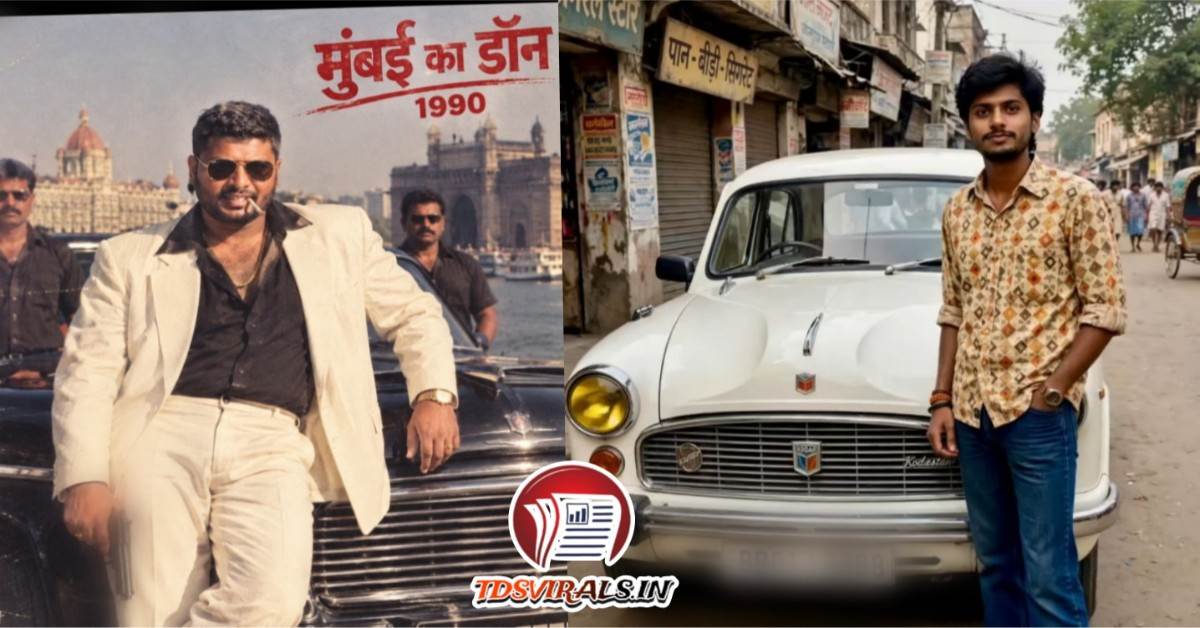
Trend 80s Technology News: Social media feeds across Instagram, TikTok, and X are undergoing a nostalgic transformation as millions of users travel four decades back in time. The viral 80s AI photo trend has captured global attention, enabling users to turn standard modern selfies into realistic 1980s-era portraits with artificial intelligence.
Unlike traditional vintage filters that simply add fake film grain or adjust color temperature, this trend uses advanced multimodal vision models within ChatGPT to recreate hairstyles, outfits, lighting setups, and backgrounds while preserving exact facial features.
[Upload Selfie] ──► [Apply 80s Retro Prompt] ──► [Refine Film Grain & Lighting] ──► [Export Vintage Portrait]
Why Is the 80s AI Photo Trend Going Viral? The surge in popularity stems from a blend of digital nostalgia and recent technical updates to generative vision models. Previous AI image crazes often struggled with identity retention, frequently altering facial structures. Upgraded image editing capabilities in ChatGPT retain recognizable facial features, skin tones, and eye shapes while overhauling surrounding elements.
The aesthetic relies on key 1980s visual identifiers:
- Hairstyles: Voluminous teased hair, bouffants, and classic perm textures.
- Wardrobe: High-waisted acid-wash denim, structured shoulder pads, blazers, and statement jewelry.
- Photography Tech: Soft-focus studio lenses, direct flash, 35mm analog film grain, and warm sepia or faded color profiles.
Viral 80s AI Photo Trend, Step-by-Step Guide: How to Create Your 1980s AI Portrait

- Select a Clear Reference Photo
High resolution and direct lighting yield the best results
Choose a clear, front-facing selfie or close-up portrait. Avoid heavy shadows, dark sunglasses, or face-covering accessories that obscure your primary facial structure. - Upload to ChatGPT
Ensure image processing is enabled on your account
Open ChatGPT on the web or mobile app. Tap the+attachment icon in the chat bar and upload your selected reference image. - Paste an Era-Specific Prompt
Specify identity preservation explicitly
Copy and paste a detailed text prompt alongside your uploaded photo. Instruct the AI to alter wardrobe, hair, and backgrounds while locking your facial identity. - Refine the Output Iteratively
Use conversational tweaks rather than starting over
If the initial result looks overly digital or modernized, ask ChatGPT for targeted adjustments—such as “add subtle 35mm film grain,” “soften the lighting,” or “change the background to a vintage living room”. - Export and Share
Use trending engagement stickers on social media
Download the final high-resolution render. Upload it to Instagram Stories, Reels, or TikTok using interactive features like the “Add Yours” sticker to join the trend.
Viral 80s AI Photo Trend, Copy-and-Paste ChatGPT Prompts for Authentic 80s Styles
1. Classic 1980s Studio Portrait
“Transform my uploaded photograph into a realistic portrait from the 1980s. Keep my facial features, face shape, skin tone, and overall identity completely recognizable. Style me in authentic 1980s fashion with voluminous hair and period-appropriate clothing like a structured blazer or denim jacket. Set the scene in a soft-focus studio with warm analog lighting, subtle film grain, and slightly faded colors. Do not make it look like a modern photo with a digital filter.”
2. Retro 1980s Cinema / Bollywood Style
“Reimagine this photo as a realistic portrait inspired by 1980s Indian cinema. Preserve my recognizable facial features and natural skin tone. Give me 1980s-era voluminous hair, period-appropriate traditional or glam attire, statement jewelry, and a classic vintage backdrop. Use warm studio lighting, soft focus, and subtle 35mm film grain to recreate an authentic retro film look.”
3. Vintage Candid Home Album Photo
“Convert this image into a candid, realistic indoor photograph taken in the mid-1980s. Preserve my exact facial identity and natural expression. Dress me in casual 1980s clothing and place me inside a warm, vintage living room setting with wood paneling and period decor. Apply subtle film imperfections, soft direct flash lighting, and realistic analog color tones.”

Key Strategies for Maximizing Image Quality
- Include Strict Identity Constraints: Phrases like “preserve my original facial structure, eye shape, and skin tone” prevent the underlying model from generating an entirely different face.
- Specify Camera Characteristics: Use technical terms such as “35mm analog film texture,” “soft-focus portrait lens,” “direct flash,” and “mild color degradation” to eliminate the sterile sharpness of digital rendering.
- Block Anachronisms: Mention negative elements like “no smartphones, modern cars, modern lighting, or digital overlays” to maintain decade accuracy.
Frequently Asked Questions – Viral 80s AI Photo Trend
What is the viral 80s AI photo trend?
It is a viral social media trend where users upload modern selfies to AI tools like ChatGPT to generate retro portraits styled after 1980s fashion, hair, lighting, and camera textures.
Can I do the 80s AI trend with ChatGPT Free?
Yes, provided your account has access to image uploads and vision processing capabilities. ChatGPT Plus or Team tiers offer faster generation speeds and higher image quotas.
How do I prevent the AI from changing my face?
Explicitly instruct the model in your prompt to keep your facial features, facial structure, skin tone, and expression intact while modifying only the hair, clothing, lighting, and background.





 Home
Home
 Facebook
 Twitter
 Instagram
 Call
Call
 WhatsApp